From : https://www.dcard.tw/f/tech_job/p/238586417?fbclid=IwAR2K0IMRpfuDvwwJV9ahFNPAioy6_MEaF8wAH13YDPUj27yRYTKcZSv_ri8
-------------------------------------------------
Foxbrush 發表在 痞客邦 留言(0) 人氣(28)

From: https://mrtopstep.com/magic-t-theory/
----------------------------------------------------------------------------
Foxbrush 發表在 痞客邦 留言(0) 人氣(109)
https://www.ptt.cc/bbs/Option/M.1238738999.A.89A.html
--------------------------------------------------------------------------------
Foxbrush 發表在 痞客邦 留言(0) 人氣(47)
From: https://hackernoon.com/set-up-ssl-in-nodejs-and-express-using-openssl-f2529eab5bb
--------------------------------------------------------------------------------
Foxbrush 發表在 痞客邦 留言(0) 人氣(5)
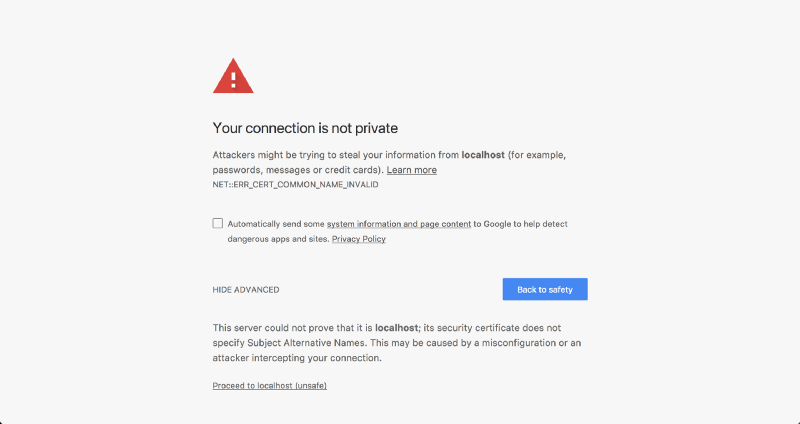
From: https://www.freecodecamp.org/news/how-to-get-https-working-on-your-local-development-environment-in-5-minutes-7af615770eec/
-------------------------------------------------------------------
Foxbrush 發表在 痞客邦 留言(0) 人氣(9)
Refs:
- https://superuser.com/questions/117642/open-up-3-terminals-run-different-commands-from-all-for-each-of-them-to-set-up
Foxbrush 發表在 痞客邦 留言(0) 人氣(321)
From: https://medium.com/sean3z/debugging-mobile-apps-with-mitmproxy-4596e56b3da2-------------------------------------------------------------
Debugging Mobile Apps with mitmproxy
Ever wonder
exactly what network connections your favorite mobile app is making? In this small walkthrough, we’ll use mitmproxy to gain insight into how some of our favorite mobile apps work.
Before getting started though, it’s worth mentioning that there are plenty of other tools that allow use to do the same; such as:
Fiddler and
Charles Proxy. I prefer mitmproxy for it’s simplicity. Fiddler is a close second as it provides far more rich network details (and Websocket frame inspection 👍)
Prerequisites:
A mobile device connected to same network as your proxy PCmitmproxy — https://mitmproxy.org/mitmproxy
This is what we’ll use to proxy information from our mobile device to our PC. mitmproxy is available for most devices: iPhone, Android and Windows phone on macOS, Windows and linux. For our example, we’ll be using an Android device on macOS Sierra.
Installation:
$ brew install mitmproxy
Usage:
$ mitmproxy
On mac, it couldn’t be much simpler to install and use. However, on Windows, you’ll need to use the
mitmweb client.
Once you invoke
mitmproxy, you should see a black screen in your terminal like the image above.
In order to use this proxy though, we’ll need to make a small configuration change on our mobile device. But before doing so, we’ll want to obtain our PC’s IP address by using
ifconfig (or
ipconfig for Windows).
Foxbrush 發表在 痞客邦 留言(0) 人氣(23)

From: http://marklin-blog.logdown.com/posts/2906519
---------------------
Foxbrush 發表在 痞客邦 留言(0) 人氣(50)
From: http://marklin-blog.logdown.com/posts/2906519
-------------------------------------------------
Foxbrush 發表在 痞客邦 留言(0) 人氣(104)
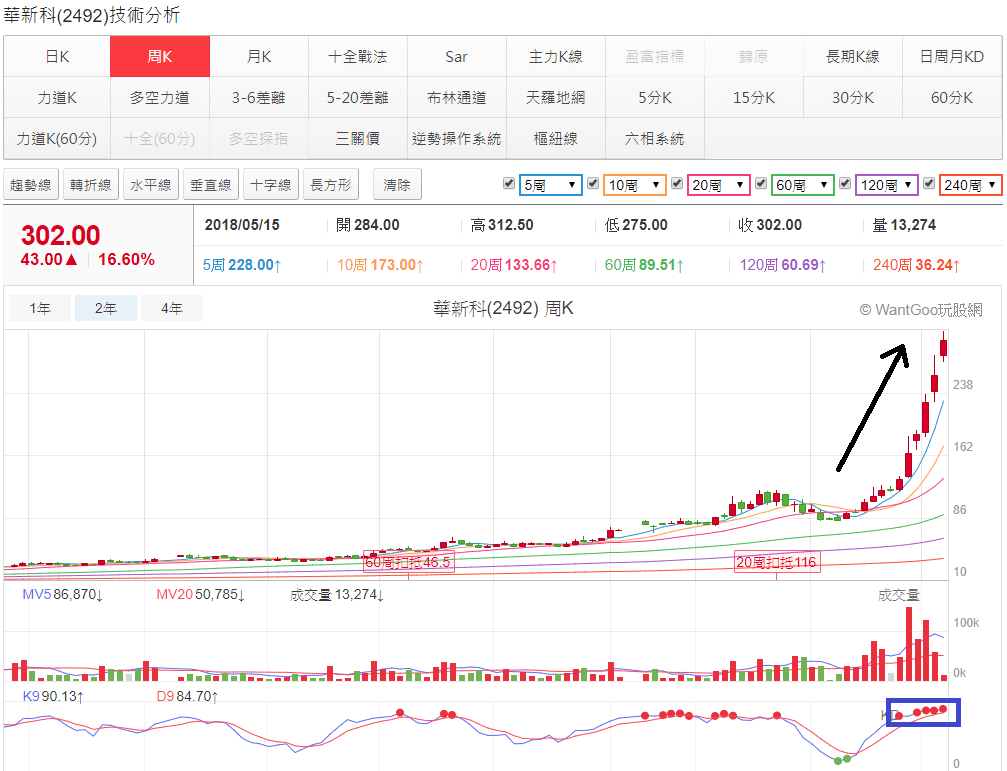 投資人最常碰到的就是某人告訴你某檔個股很好,你看到之後常發現漲幅已經很大,想買買不下手,心裡常想有選股方法是剛剛轉強的股票,可以進場來買進而不用去追高嗎? 通常有兩種股票比較會漲,一種是先前寫過文章介紹強勢股來敲門,你怎能不開門迎接?找主升段的股票,就是從大盤還沒開始漲的時候就領先起漲,大盤在漲它續漲,一直漲到大盤掛掉為止,它線圖大概會漲下圖一這個樣子。
Foxbrush 發表在 痞客邦 留言(0) 人氣(150)

